555 KUBIK | facade projection | from urbanscreen on Vimeo .
Posts
Free PDF generator library for C#
i TextSharp Download the iTextSharp library http://sourceforge.net/projects/itextsharp/ Documentation http://itextsharp.sourceforge.net/tutorial/index.html Example from SinhalaGospel.com private void GeneratePdf(int contID) { string path = ""; Document document = new Document(); try { cGospel gospel = new cGospel(); tbl_Gospel dtCont = gospel.GetContent(contID); string contentID = dtCont.ContentID.ToString(); string gospelTitle = dtCont.Gospel; string chapterID = dtCont.ChapterID.Value.ToString(); string titleID = dtCont.TitleID.ToString(); string title = dtCont.Title; string content = dtCont.Content; path = "../Contents/"+gospelTitle+"_"+chapterID+"_"+titleID+".pdf"; PdfWriter.GetInstance(document, new FileStream(Server.MapPath(path), Fil...
Scale Down Images in C#
1) open a file stream FileStream fs = File.OpenRead(fullImgPath); 2) load the image Image fullImg = Image.FromStream(fs); 3) define the new height int thHeight = Convert.ToInt32(ConfigurationManager.AppSettings["thumbHeight"]); 4) define a callback function when thumbnail abort Image.GetThumbnailImageAbort dummyCallback=new Image.GetThumbnailImageAbort(ThumbnailCallback); 5) set the new height and width of the image using GetThumbnailImage function Image thumbImg = fullImg.GetThumbnailImage((int)(fullImg.Width * thHeight) / fullImg.Height, thHeight, dummyCallback, IntPtr.Zero); 6) save the thumb image thumbImg.Save(thumbImgpath); 7) dispose thumbImg.Dispose(); 8) the call back function implementation public static bool ThumbnailCallback() { return false; }
How to present data in DataGridView with objects collection in C#
Some times we can't just bind data source to a datagridview as we need much deeper data to be presented in our grid. In such a situation we can use the following method to get it done. 1) Prepare your Grid with columns as usual 2) Let say our datasource consists this structure Classes are like this 1: public class Player 2: { 3: public int ID{get;set;} 4: public string FirstName{get;set;} 5: public string LastName{get;set;} 6: public string FullName 7: { 8: get { return FirstName + " " + LastName; } 9: } 10: public int Age{get;set;} 11: public string NIC{get;set;} 12: public Style PStyle{get;set;} // associated Style property 13: } 14: public class Style 15: { 16: public int StyleID{get;set;} 17: public string Name{get;set;} 18: } Using Player class I need to get a list of Players to the grid 1: List bowlers = DataAccess.GetBowlers(); I need to show the bowler's first name...
Tips Sites Web UI
Web UI 1) Tips & Tricks - Web development http://snook.ca/ 2) 10 Principles Of Effective Web Design http://www.smashingmagazine.com/2008/01/31/10-principles-of-effective-web-design 3) 27 Best Photoshop Web Layout Design Tutorials http://dzineblog.com/2008/07/best-photoshop-layout-design-tutorials.html 4) CSS Framework http://www.blueprintcss.org/ 5) How to Create Web 2.0 Site http://web2.ajaxprojects.com/web2/newsdetails.php?itemid=29 6) jQuery simplyScroll - Logicbox http://www.logicbox.net/jquery/simplyscroll/horizontal.html
Combobox column to DataGridview in C# (window forms)
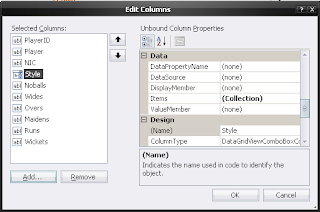
In many situations we need to add a combobox to our datagrid, where users can select an option. I here show you how to add a combo box to a DataGridView control and attach datasource to it easily. 1) First insert a DataGridView control to your form 2) Then add your columns using Columns in property window(VisualStudio) 3) Click Add... button to add a combo box column 4) Give a name for your Combobox Column ! important - in my case its 'cmbStyle' 5) Ok the Dialogboxes and goto Codebehind 6) You can place the combobox databinding code in FormLoad method, because combobox will get populated for each row when a datasource is bind to the datagridview. private void Frm_Load(object sender, EventArgs e) { List styles = DataAccess.GetBowlingStyles(); cmbStyle.DataS...